
Stratasys® F770 EEPROM & Material Unlock
Open your F770 material workflow to compatible and third-party filament without an external EEPROM writer or powered material dongle.
Printer model, serial number and software version are confirmed before delivery.

See the material unlock working.
Actual F770 printer screens before and after applying the NEXT 3DP printer-side material unlock.
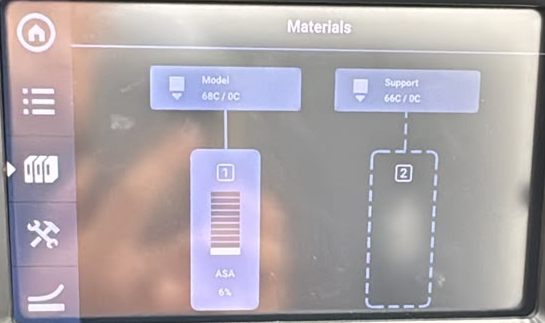
Actual F770 material state before the NEXT 3DP software unlock is applied.
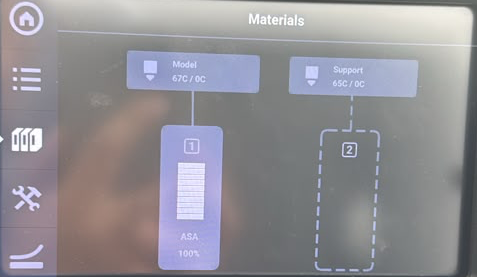
The F770 displays ASA at 100% after activation. Check the spool separately for remaining filament.
Material freedom without adding hardware to the printer.
NEXT 3DP developed the F770 unlock around the printer itself. There is no external EEPROM programmer or powered material-bay device that must remain connected.
Material Quantity Unlock
Continue using suitable compatible material beyond the normal electronically tracked material quantity.
Printer-Side Software
The solution runs on the F770 printer rather than requiring an external writer or powered material dongle.
Third-Party Material
Open the machine to suitable compatible filament and more flexible material sourcing.
Built for the F770 platform.
Current NEXT 3DP F770 Material Unlock coverage:
One license covers one serial number. Already-disabled EEPROMs are unsupported. For other F-Series printers, see F123 Material Unlock.
F770 Material Unlock
A straightforward printer-side solution for owners who want more control over the material they run through their F770 system.
Stratasys F770 • High-capacity material system
- Printer-side software solution
- No external EEPROM writer required
- No powered material-bay DRD required
- Printer-specific compatibility confirmation
- Installation procedure included
Common questions.
Is this an F770 EEPROM unlock?
Yes. The terms F770 EEPROM unlock, material-chip unlock and material unlock are commonly used for this type of restriction. NEXT 3DP addresses the workflow on the printer side rather than requiring an external EEPROM programmer.
Do I need an EEPROM writer or powered material dongle?
No. The NEXT 3DP F770 solution is printer-side software. It does not require a separate Fortus-style EEPROM writer or a powered material-bay DRD to remain connected.
Can I use third-party filament on the F770?
The material unlock opens the F770 material workflow to suitable compatible material. The filament itself must still be appropriate for the printer, printhead and process conditions.
What happens after the printer is rebooted?
The current release remains active until a full printer reboot. After rebooting, reapply the supplied USB procedure.
Which software versions are supported?
Provide the installed printer software version with your order. NEXT 3DP confirms compatibility before preparing your USB package.
NEXT 3DP is independently operated and is not affiliated with, sponsored by, endorsed by, or authorized by Stratasys Ltd. Stratasys® and F770®, along with other referenced OEM names and trademarks, remain the property of their respective owners. References are provided solely for identification and compatibility purposes.